Personalize Your Android Auto Interface for a Safer, Smoother Drive
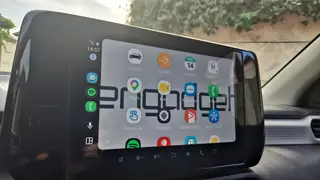
Android Auto offers deeper customization than most users realize, allowing drivers to rearrange apps, create one-tap shortcuts, and tailor the dashboard to their habits. Settings can be adjusted from the phone or in-car screen, with options to hide unused apps or set up voice-activated actions like sending updates to family. These tweaks enhance both usability and safety during daily commutes.
On October 27, 2026, Engadget published a guide by Gabriela Vătu detailing how users can deeply customize their Android Auto interface beyond its default settings. The article highlights specific features available through Android Auto’s Settings menu—accessible both from the connected smartphone and in-car screen—such as rearranging app icons, hiding unused applications, creating one-tap shortcuts for contacts or Assistant actions, and adjusting layout preferences between map and media display. Users can also mirror their phone’s wallpaper onto the car’s infotainment system, force day or night mode on maps, and disable automatic media playback at startup. These adjustments are designed to improve both usability and safety during driving by reducing distraction and tailoring the interface to individual habits.
The background for this feature set lies in Google’s ongoing effort to make Android Auto more than a passive display of smartphone content. While earlier versions offered limited customization, recent updates have expanded user control, reflecting broader industry trends toward personalization in automotive tech. The article references prior reporting on Android Auto’s capabilities, suggesting that many users remain unaware of these options despite their availability since at least 2023. Key players include Google (driving the software ecosystem), automakers integrating Android Auto into vehicles, and end-users seeking safer, more intuitive driving experiences. What re
Android Auto’s growing customization options could significantly impact driver safety and user satisfaction by reducing cognitive load during commutes. By enabling drivers to prioritize frequently used functions—like navigation or music—through one-tap access, the system may help minimize distractions, potentially lowering accident rates. This aligns with broader industry goals in automotive UX design, where intuitive interfaces are increasingly seen as critical for safety. The ability to mirror phone wallpapers and adjust layouts also reflects a shift toward personalizing in-car environments, similar to how smartphone ecosystems evolved from generic to highly individualized experiences. Such refinements may influence consumer expectations for vehicle infotainment systems, pushing automakers to offer more flexible software integration or even open platforms. A comparable precedent is the rise of Apple CarPlay’s customization features, which similarly aimed to reduce driver distraction